See your day at a glance. AtTheTime user guide
The app that keeps your routines, checklists, D-Days and anniversaries in one place. Follow the screens and anyone can get started.
How can we help?
What you can learn here
- RoutinesRun steps in order, or work through sub-goals one by one.
- ChecklistsWrite down tasks like groceries and tick them off.
- D-DaySee the days left until a date you look forward to.
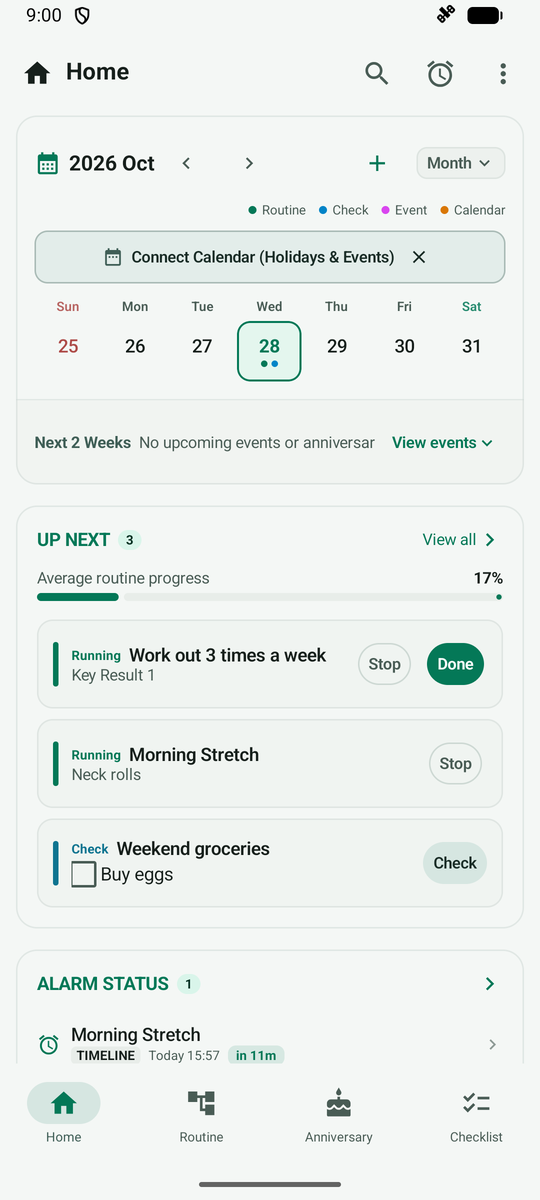
- HomeSee today’s schedule and what to do now on one screen.
- SearchFind routines, checklists and anniversaries at once.
- Creation WizardPick a template that fits you and start easily.
Use cases
See all use casesStart in 3 steps
Popular questions
How do I change the app language?
Tap More (three dots) at the top right > Settings, then tap Language under Appearance at the top. You can choose System Default, 한국어 (Korean) or English.
Do I have to allow notification or calendar permissions?
Not when you first launch the app. A notice appears the first time you use a feature that needs a permission, such as step alarms, and you can set it up or close it then.
What is the difference between step-by-step and goal modes?
A step-by-step (Timeline) routine runs its steps in the order you set. A goal routine lets you work through sub-goals in any order. Choose with the chips at the top of the new routine screen.
How can I pick a D-Day date quickly?
On the date screen, tap a quick-pick button (Today, Tomorrow, This Weekend, +100 Days) and the date changes right away. You can also pick from the calendar.
I do not see the Statistics tab.
Statistics is a Labs feature. Turn on Statistics & Analytics under Experimental near the bottom of More > Settings and the tab appears at the bottom.
Still have a question?
Send us an email and we will get back to you.
dream.in.stack@gmail.com